
| Basic information | |
|---|---|
| Founded | 2012 |
| Legal Structure | Private |
| Industry | Health, Technology |
| Also known as | Whoop, Inc.; Bobo Analytics, Inc. (formerly) |
| Official website | https://www.whoop.com/ |
Whoop, Inc. (stylized as WHOOP) is an American wearable technology company headquartered in Boston, Massachusetts.[1][2] Its principal product is a health tracking wristband that measures strain, recovery, and sleep.[3][4] Its original name was Bobo Analytics, but it got renamed to Whoop on 13 December 2013.[5] The device is best known for its use by athletes, and requires a subscription in order to process the data it gathers from the user's body.[6][7][8][9][10] Whoop, Inc. also sells wearable biceps bands and various other items such as colorful straps.[11]
Consumer impact summary
Digital discontinuation bricking concerns
No basic tracking capabilities of the Whoop wearable device are available to users without a subscription, because it will not sync the data with the app.[12] The device is designed to be useless when there is no active subscription, which is a form of self-destructive design.[13]
Forced app download
Whoop offers a limited set of information in the web experience, while the mobile app provides "comprehensive insights including Strain, Recovery, Sleep tracking, WHOOP Coach, and other health metrics with a rich, interactive interface designed for on-the-go use." This forces the user to use the mobile app in order to get full access to the features they paid for.[14][15]
Lengthy cancellation process
As of 11 March 2026, the process to cancel a Whoop subscription involves navigating ~11 different pages.[16][17][18] An average cancellation might take around 15 minutes.[19] This raises ethical concerns around not implementing the FTC's click-to-cancel rule, which asks services to make cancellation as easy as it is to sign up.[20]
Starting from the Membership menu, the customer is required to find "Cancel your Membership" button at the bottom (Step 1). Then within a page that presents retention offers, click "Take survey to cancel" and avoid those retention offers. To complete the cancellation, a survey must be taken on why they want to cancel their subscription.[19]
The "Cancel my Subscription" button is at the bottom of the "memberships" page. A big "PAUSE MEMBERSHIP" button is displayed above it. This button is stylized and red. Below it there is the "Cancel my Membership" text. This text is underscored and doesn't look like a button. To access this "Cancel my Membership" text one has to scroll down and then look specifically for this text.[16]
Once the user clicks on the "Cancel my Membership" text they will be greeted by a huge red "Remain a member" button. Below this button is an underscored "Take survey to cancel" text. This almost looks like a "get back to the previous page" text.[16]
-
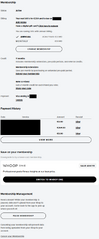 Step 1 of the Whoop subscription cancellation process.
 -
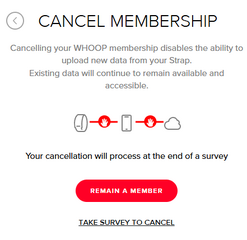 Step 2 of the Whoop subscription cancellation process.
 -
 Step 3 of the Whoop subscription cancellation process


On the next page it will tell you to pause your membership instead. It then shows you the benefits from pausing your membership. It lists the following benefits with this headline:
Headline: "take a break and use your remaining months later" & "pausing your membership will allow you to:"
- Use the remaining 352 days of your membership later
- Save your existing data until you’re ready to come back
- Pause billing and data uploads, you can unpause at any time
This time instead of the "REMAIN A MEMBER" button there is a red "PAUSE MEMBERSHIP" button in all caps. Just below is a "NO THANKS, STILL CANCEL" text which isn't highlighted in any color. If you click the "NO THANKS, STILL CANCEL" text the user will see the following: "Cancelling your WHOOP membership disables the ability to upload new data to your strap." It will ask you the following question: "What’s the primary reason you decided to cancel your WHOOP membership?".

It lists various answers:
- I misplaced the sensor and don’t want to pay for a replacement
- Didn’t provide features I expected
- Unhappy wearing the strap (fit, comfort, durability, etc.)
- I had a life change that made it difficult to use the product (pregnancy, injury, work schedule, etc.)
- I’m not confident in the pace of innovation
- Didn’t trust the accuracy of the data
- The sensor was not working properly
- I can no longer afford the subscription
- Didn’t help me meet my personal goals
- Customer service issues
- Other

If the user doesn't want to answer any of these questions they can click on "Other". This will show a little box where the user can enter their reason and click on "Next" afterwards. It will then show a "GIVE FEEDBACK" page with a sub-headline that states "Feedback helps WHOOP improve." It asks you "When did you decide you would not renew?" and gives four answers.
- 1 WEEK BEFORE RENEWAL
- 1 MONTH BEFORE RENEWAL
- 3 MONTHS BEFORE RENEWAL
- OVER 3 MONTHS BEFORE RENEWAL

The user cannot skip the questions. Once the user clicks on an answer they will be asked the following question: "Are you planning to switch to another device? If yes, which device?". It lists various competitors' devices. The user cannot skip over this question.
- Apple Watch Ultra
- Google Pixel Watch
- Ultrahuman Ring
- Fitbit
- Samsung Galaxy Watch
- Oura Ring
- Samsung Galaxy Ring
- Garmin
- Apple Watch
- I'm not switching to a new device
- Other

The "other" button will show a box where the user can enter their reason and click on next. This takes at least two clicks to do as with the previous "Other" button. After this question the user will be asked "Which of the following best describes why you decided to switch to this device?". It offers multiple answers again.
- The product was certified by a scientific organization
- I liked the device form factor the most (e.g., ring, wrist-based)
- The brand resonated with me
- I followed a recommendation from a friend or family member
- I saw value after completing a free trial
- The offering was easy to understand
- I trusted a review
- The product had the best feature set
- I saw the product in-store
- The product was well-priced
- The device is the most accurate
- Other
-
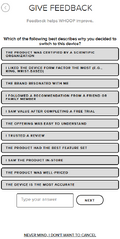 Step 10 & 11 of the Whoop subscription cancellation process
 -
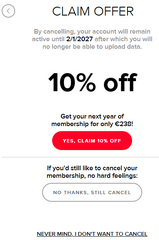 Step 11 of the Whoop subscription cancellation process
 -
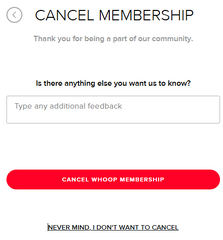 Step 12 of the Whoop subscription cancellation process
 -
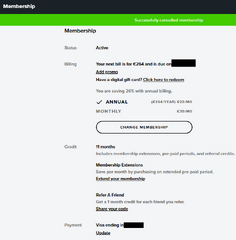 Screenshot of a successful Whoop subscription cancellation process
 -
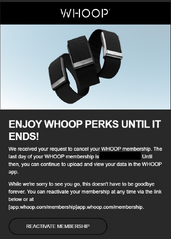 Whoop Subscription Cancellation E-Mail


Clicking on the "Other" button prompts you to put in a custom answer again. Then the user can click on "Next". On the next page the user is greeted by a red "CLAIM OFFER" headline and a red button that says "YES, CLAIM 10% OFF". Below that button is a non-highlighted "NO THANKS, STILL CANCEL" button. Once you click on that the new page says "CANCEL MEMBERSHIP".[citation needed (11 Mar 2026)]
Removal of payment method
There is no button to remove the payment method.[21] The user can update the payment method. Whoop will charge the payment method with 1$ to verify functionality. The user has no assurance that their payment method won't be charged if they can't remove it.[citation needed (11 Mar 2026)]
Incidents
Anticompetitive lawsuit against Bevel
This section is incomplete. This notice can be deleted once all the placeholder text has been replaced.
Whoop filed a lawsuit against competing fitness startup Bevel, claiming their smartphone app was too similar in design to Whoop's.[22]
See also
References
- ↑ Heater, Brian (2021-08-31). "Whoop raises another $200M for its athlete-focused fitness wearable". TechCrunch. Archived from the original on 12 Jan 2026. Retrieved 2021-10-14.
- ↑ "Whoop Terms of Use". Whoop. 2025-10-09. 24. CONTACT Contact Us. If you have any questions regarding the Services, please contact Membership Services via support.whoop.com or call 1-833-948-0566. Our mailing address is Whoop, Inc., One Kenmore Square #601 Boston, MA 02215. Archived from the original on 24 Feb 2026. Retrieved 2026-02-13.
- ↑ Rovell, Darren (2017-03-06). "MLB approves device to measure biometrics of players". ESPN. Archived from the original on 7 Feb 2026. Retrieved 2021-10-14.
- ↑ Willgress, Lydia (2021-04-14). "We put Whoop's fitness tracker strap and membership experience to the test". The Indepentdent. Archived from the original on 6 Oct 2025. Retrieved 2021-10-14.
- ↑ "Business Entity Summary". corp.sec.state.ma.us. Archived from the original on 25 Jun 2026.
- ↑ Martinelli, Michelle (2016-07-29). "Wearable apps help Olympic athletes train at their best". USA Today. Archived from the original on 3 Jul 2024. Retrieved 2021-10-14.
- ↑ Lindemann, Hannah (2021-03-31). "Whoop Strap im Test". Runner's World. Archived from the original on 7 Oct 2025. Retrieved 2026-02-13.
- ↑ Hüber, Frank (2021-04-20). "Whoop Strap 3.0 im Test: Dauerdatenlieferant für Fitness, Schlaf und Erholung". Computerbase. Archived from the original on 17 Jan 2025. Retrieved 2026-02-13.
- ↑ Carlsen, Janina (2025-05-14). "Whoop 5.0 im Praxis-Test: Der aktuell teuerste Fitnesstracker". Computerbild. Archived from the original on 8 Dec 2025. Retrieved 2026-02-13.
- ↑ "Memberships made for you". Whoop. 2026-02-13. Archived from the original on 7 Sep 2025. Retrieved 2026-02-13.
- ↑ "4.0 Bands". Whoop. 2026-02-13. Retrieved 2026-02-13.
{{cite web}}: CS1 maint: url-status (link) - ↑ Austin, Max (12 Mar 2026). "Can You Use Whoop Without Membership? Here's the Truth". Wearald. Archived from the original on 30 Aug 2026. Retrieved 12 Mar 2026.
- ↑ Randall, Nick (13 Jul 2023). "Whoop Without Membership: our Guide to Fitness Tracking". Thewearify. Archived from the original on 23 Sep 2023. Retrieved 12 Mar 2026.
- ↑ Benger, Liv (Oct 2025). "Whoop APP complete desktop web version". WHOOP. Archived from the original on 26 Sep 2026. Retrieved 12 Mar 2026.
- ↑ Schlotterbeck, Noor (Nov 2025). "WHOOP coach on browser or desktop app". WHOOP. Archived from the original on 26 Sep 2026. Retrieved 12 Mar 2026.
- ↑ 16.0 16.1 16.2 Tips With Alam (5 May 2026). "How To Cancel Whoop Membership in 2026". youtube.com. Archived from the original on 25 Jun 2026.
- ↑ noooor (2025-12-01). "How do I cancel a membership?". Archived from the original on 2026-02-13. Retrieved 2026-02-13.
- ↑ "Canceling Your Membership". Whoop. 2026-10-06. Archived from the original on 28 Jul 2025. Retrieved 2026-02-13.
- ↑ 19.0 19.1 Khan, Bella (2 Feb 2026). "How To Cancel Your Whoop Subscription (2026)". Chargeback. Archived from the original on 24 Dec 2025. Retrieved 11 March 2026.
- ↑ "The FTC's "Click to Cancel" Rule" (PDF). Federal Trade Commission. 2024. Archived (PDF) from the original on 22 Nov 2025.
- ↑ Benger, Liv (2025-11-01). "Payment card to be removed". WHOOP. Archived from the original on 17 Dec 2025. Retrieved 2026-02-13.
- ↑ Bevel (2026-04-03). "Whoop sued us..." YouTube. Archived from the original on 2026-09-08. Retrieved 2026-09-08.